
What it is
A client plugin that slows down or stops drawing the game while you are away. Your character stays logged in and keeps doing exactly what it was doing. It is on by default for every player, with no requirements.
Getting there
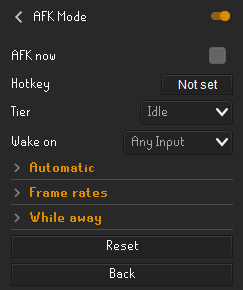
Open the Configuration button on the client sidebar, search for AFK Mode and open its settings.
How it works
Pick a Tier (the default is Idle).
Tick AFK now, press your Hotkey, or let one of the Automatic timers start it.
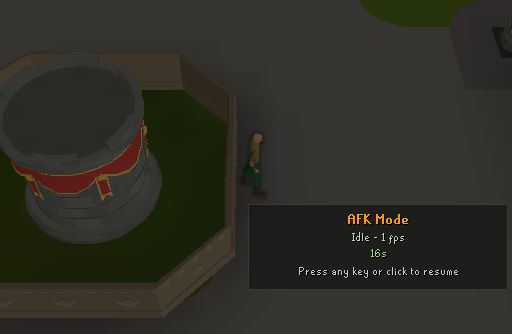
The game dims behind an AFK Mode panel that shows the tier, the frame rate and how long you have been away.
Press any key to come back. Clicks and mouse movement also wake it, depending on Wake on.
Tiers
| Tier | What it does |
|---|---|
| Reduced | Slower frames (10 fps by default), nothing else changed |
| Idle | 1 fps by default, other players and NPCs hidden, sound muted |
| Deep | Screen paused and caches released. Takes a moment to come back |
| Minimal | Renderer stopped, nothing drawn, window minimized and unused memory handed back to Windows. Takes a few seconds to come back |
Interface and controls
| Setting | Default | What it does |
|---|---|---|
| AFK now | Off | Enters your tier straight away. Unticks itself when you come back |
| Hotkey | Not set | Toggles your tier on and off |
| Tier | Idle | The tier used by AFK now, the hotkey and the timers |
| Wake on | Any Input | Any Input, Click Or Key, or Key Only. A key press always wakes |
| After idle (minutes) | 0 (off) | Enters your tier after this long with no input (up to 240) |
| After unfocused (seconds) | 0 (off) | Enters your tier this long after the window loses focus (up to 3600) |
| Reduced / Idle / Deep fps | 10 / 1 / 0 | Frame rate of each tier. Deep at 0 pauses the screen |
| Mute sound | On | Mutes sound effects in Idle, Deep and Minimal |
| Hide other entities | On | Hides other players, NPCs and projectiles in Idle, Deep and Minimal |
| Release caches (Deep) | On | Clears item and NPC caches when entering Deep. Skipped while an interface is open |
| Release GPU memory (Deep) | Off | Stops the 117 HD or GPU renderer in Deep. Only when you enter Deep yourself |
| Minimize window (Minimal) | On | Minimizes the client when entering Minimal |
| Opening the window wakes it (Minimal) | Off | When off, opening a Minimal client from the taskbar only shows the paused AFK screen |
Tips
Running several clients? Use Minimal: it frees the most memory and CPU while every character stays online.
Being logged out (for example a server restart) wakes a Minimal client by itself, so the login screen shows normally.
Keep After unfocused well above a few seconds, so quick alt-tabbing does not trigger it.