
What it is
An in-game Hiscores window with a ranked list for Overall and every skill. Your own row is always shown under the list, and you can look up any player by name.
Opening it
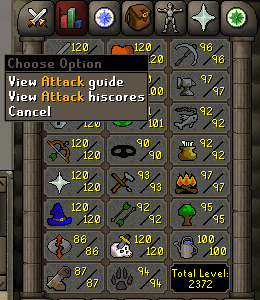
Open the Stats tab.
Right-click a skill and pick View skill hiscores (for example View Attack hiscores).
Right-click the Total level box and pick View Overall hiscores for the Overall list.
Left-clicking a skill still opens its skill guide; the hiscores entry is in the right-click menu.
How ranks work
Each row shows Rank, Name, Level (Overall: Total level) and XP.
Skills are ranked by most XP. On equal XP, whoever reached it first ranks higher.
Overall is ranked by total level, then total XP, then who got there first.
You join a skill's list once you have gained XP in it (Hitpoints: XP above the starting level 10).
Your own row is always under the list. If you are not on the chosen list, it says why.
Interface and controls
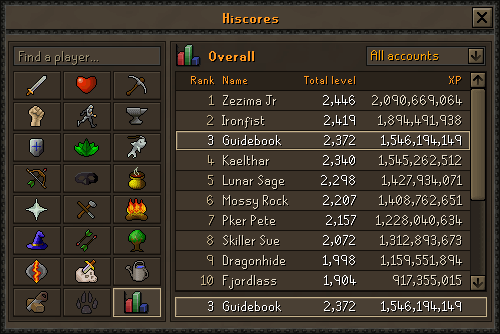
Skill grid (left): the same layout as the Stats tab. Click an icon to switch list; hover it for the skill's name. The Total level cell is Overall.
List (right): scroll with the mouse wheel or the scrollbar. Click a name to open that player's page.
Your row (bottom): when you are on the list, click it to open your own page.
Find a player...: type a name and press Enter. If there is no such account, the box shows Not found: and the name for a moment.
Account dropdown: switches which accounts the list ranks.
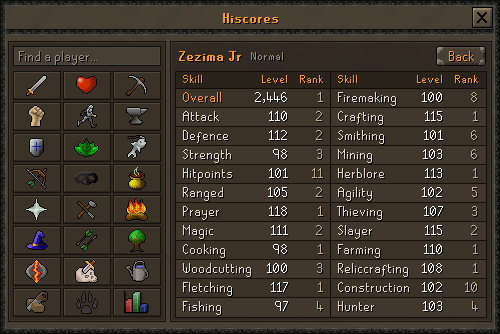
Player page: every list for one player in two columns (Skill, Level, Rank). Hover a row for the XP, click a skill to open that list, or click Back to return.
A rank of -- means the player is not on that list.
The 2B XP cap
Every skill caps at 2,000,000,000 XP (it used to stop at 200M).
Level 120 (104,273,167 XP) is still the highest level; XP keeps counting past it.
Tips
Opening the window sends in your latest XP, but the lists are re-sorted in the background, so a fresh rank can take a little while to show.