
What it is
A squad is a team of up to 12 players with an owner, officers and members. Squadmates who fight near each other can unlock Synergy boosts and fill the squad's Squad Surge bar together.
Getting there
Open the clan chat tab and press View Squad at the top (View Clan switches back).
From there: Find and Create when you're not in a squad, Open squad when you are.
Requirements
Not a Group Ironman: Group Ironmen keep their Group in this tab and can't be in a squad.
One squad at a time.
Only one account per computer can be in a squad.
How it works
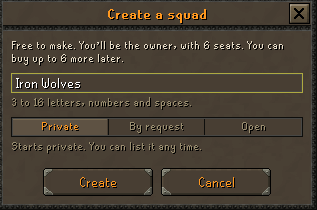
Create a squad (free). Pick a name of 3 to 16 letters, numbers and spaces. You become its Owner with 6 seats.
Choose how players get in: Private (invite only), By request (on the Squad Finder, you or an officer accept or deny) or Open (on the Squad Finder, anyone joins straight away). Full squads leave the list.
To join someone else's squad, press Find, pick a squad and press Join squad or Request to join. An invite from an owner or officer shows up as a Yes / Cancel prompt.
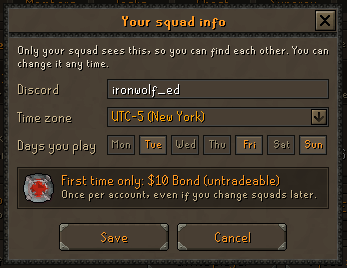
Fill in your squad info (Discord username, time zone, days you play) for a one-time $10 Bond (untradeable).
Fight alongside your squadmates. Once unlocked, your Synergy boosts switch on by themselves while you fight together.
Roles
| Owner | Officer | Member | |
|---|---|---|---|
| Invite players, accept or deny requests | Yes | Yes | No |
| Kick members | Yes | Yes | No |
| Kick officers, change roles | Yes | No | No |
| Rename, motto, listing, seats, disband | Yes | No | No |
There is always one owner. Making someone else owner (Change role, then Make owner) turns you into an officer.
The owner can't leave: make someone else owner first, or Disband squad (you type the squad's name to confirm).
Seats
The owner buys seats 7 to 12 with Platinum Vouchers from the inventory (Squad settings, Add seat).
| Seat | 7 | 8 | 9 | 10 | 11 | 12 |
|---|---|---|---|---|---|---|
| Platinum Vouchers | 10 | 20 | 30 | 40 | 50 | 60 |
Squad info and the $10 Bond
Only your squad sees your info. Save turns on once a Discord username is typed; you can edit it any time for free.
The $10 Bond (untradeable) comes once per account, ever, even if you change squads later. The account must be at least 3 days old; a younger account can save its info now and gets the bond at a later login.
Only one bond per computer.
Until you fill it in, you're reminded at login and the Squad tab shows a Fill in your squad info card.
Squad Synergy
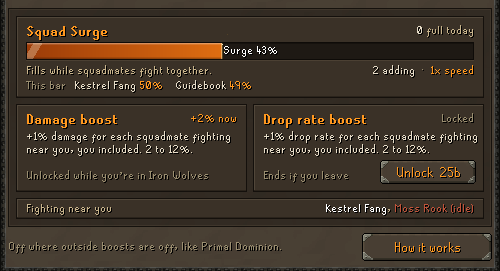
Two unlocks, bought separately on the Synergy tab of the squad window: Damage boost and Drop rate boost. Each costs 25b (25,000,000 Platinum tokens) from your inventory.
Each boost gives +1% for each squadmate fighting near you, you included, from 2 players up. Two of you fighting together get +2%, four get +4%, and so on.
You must be fighting too: standing still gives no boost.
The damage boost counts on hits against npcs, not against players.
Squadmates who haven't unlocked anything still count toward your boost.
An unlock lasts while you stay in that squad. Leaving, being kicked or the squad being disbanded ends it, and joining again means paying again.
Hits on npcs while squadmates fight near each other also fill the squad's Squad Surge bar. It drains when nobody is adding to it.
Interface and controls
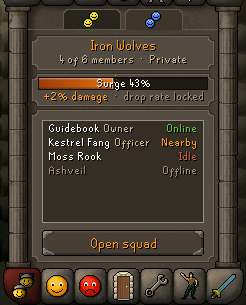
Squad tab: squad name, member count and listing, the Surge card (bar plus your boost line), every member with their state (owner and officers also show their role), and Open squad. Click a member to see their info.
Member states: Nearby (fighting near you, counts for your boost), Idle (near you but not hitting, doesn't count), Online, Offline. Nearby and Idle only show while you're fighting yourself.
Click the Surge card to open the squad window on the Synergy page.
Squad window: Squad (your info, Invite player, Squad settings or Leave squad), Members (pick a member; Change role, Kick, Requests).
Squad Finder: Find a squad with a search box, Requests (your requests and invites), and Create a squad.
Tips
You can have 3 requests open at once; a request lasts 7 days. After a deny you can ask the same squad again after 24 hours.
Invites last 5 minutes and hold a seat while they wait.
The owner can rename the squad once every 7 days. A motto is up to 40 characters.
The boosts are off where outside boosts are off, like Primal Dominion.